Top 5 Fusion Splicers of 2026: Precision Tools for Fiber Optic Professionals
Highlights
- Fusion splicers remain the backbone tool for building low-loss fiber optic connections in telecom, FTTH/FTTx, and data center applications — and demand is accelerating in 2026 as AI-driven data center buildouts compound with continuing FTTH rollouts.
- The 2026 generation of splicers fuses single-mode fiber in roughly 5–8 seconds and heat-shrinks protection sleeves in 8–16 seconds, with typical SM splice loss of 0.01–0.02 dB.
- AI has officially arrived in fusion splicing: Sumitomo Electric's patented NanoTune™ technology automatically optimizes arc conditions from the fiber end face, and cloud-connected maintenance is now standard on flagships.
- Our top-rated models for 2026 are the Fujikura 90S+, INNO View 8+, Sumitomo Electric T-72C+, JILONG 260T, and KomShine FX39 — each suited to different use cases and environments.
- Proper training, maintenance, and calibration (electrode care, cleaver blade rotation, firmware updates) remain the keys to long-term splicer reliability and precision.
- Choosing the right splicer still comes down to your project type, fiber format (single vs. ribbon), budget, and need for portability or smart features.
Why a Reliable Fusion Splicer Matters
When it comes to fiber optic networks, precision and dependability are everything. A reliable fusion splicer ensures seamless connections, reduces downtime, and optimizes performance. For industry professionals managing expansive networks or intricate installations, the right fusion splicer can significantly enhance efficiency and output, making it an indispensable tool in today's fast-evolving fiber optic landscape.
That landscape is moving faster in 2026 than at any point in the past decade. Data centers keep trending toward reduced-diameter, higher-density, ultra-high-fiber-count cable as generative-AI capacity builds out — at OFC 2026 in Los Angeles, Sumitomo Electric's 16-fiber ribbon fusion splicer earned top score (4.5 out of 5) in the Data Center Fiber category of the 2026 LIGHTWAVE INNOVATION REVIEWS. Meanwhile, FTTH and FTTx deployments continue to expand on every continent. More fiber in the ground and in the rack means more splices — and the quality of those splices matters more than ever.
The Role of Fusion Splicing in Fiber Optics
Fusion splicing plays a pivotal role in creating high-performance fiber optic networks. It joins two optical fibers end-to-end using a precise electric arc, delivering a connection with minimal signal loss and reduced reflection. This process is especially critical in applications requiring high-speed, long-distance data transmission, such as FTTH (Fiber-to-the-Home), broader FTTx deployments, and data center infrastructure. Because every splice in a link adds potential loss, the difference between a 0.02 dB splice and a 0.05 dB splice compounds quickly across backbone routes with hundreds of joints. Considering the rapid expansion of these technologies, the quality of those splices is more vital than ever.
What Makes a Fusion Splicer "Best"?
Not all fusion splicers are created equal. A true industry-leading splicer in 2026 combines accuracy, speed, durability, user-friendliness, and modern connectivity. Whether it's splicing single fibers or entire fiber ribbons, the splicer must align with the tasks at hand, the technician's requirements, and unique conditions like harsh environments or tight spaces. Two trends separate this year's best machines from the pack: intelligent automation — from AI-optimized arc control to automatic fiber seating — and ecosystem features like cloud data management, app connectivity, and preventive maintenance alerts. Durability under real-world conditions, along with fast and intuitive operation, ensures technicians can perform consistently and with confidence.
Target Users
Fusion splicers are designed for network engineers, telecom contractors, ISPs, enterprise network teams, and field installers. These professionals rely on robust tools that streamline their workflow, maintain network integrity, and accommodate growing demands for bandwidth. Data center construction crews have joined the traditional telecom audience in a big way, splicing high-count trunk cables and parallel-fiber harnesses for AI clusters. Each user group has specific needs, but all share one priority — tools they can trust to get the job done right the first time.
Types of Fusion Splicers
Selecting the right fusion splicer is critical for ensuring optimal performance and reliability in fiber optic networks. Each type of splicer is designed to meet specific application needs, balancing precision, efficiency, and cost.
Core Alignment vs. Cladding Alignment
Core alignment splicers offer high-precision splicing, making them the go-to choice for backbone networks and critical infrastructure. These devices use advanced imaging systems to align the fiber cores — in the newest models, "high definition" core imaging — minimizing splice loss and ensuring a stable connection. They're essential in applications where uncompromising performance and reliability are paramount, and where technicians must splice mixed or unusual fiber types (the Sumitomo T-72C+, for example, covers everything from G.651 through G.657 plus erbium-doped fiber).
Cladding alignment splicers provide a more budget-friendly alternative. Instead of aligning fiber cores, they align the fiber cladding geometrically, which delivers slightly higher splice loss on mismatched fibers but is fully adequate for standard same-type splices. They're optimal for high-volume, cost-sensitive projects like FTTH (Fiber to the Home) and LAN installations — which is exactly where the JILONG 260T plays.
Single Fiber vs. Ribbon Fiber Splicers
Single fiber splicers are designed for individual fiber splicing, offering unparalleled control and precision. These are widely used in repairs, maintenance, drop-cable terminations, and installations with low fiber counts.
Ribbon fiber (mass) splicers take efficiency to another level by fusing multiple fibers simultaneously — traditionally up to 12, and now up to 16 fibers in the newest generation. This capability makes them indispensable for high-density cabling environments such as data centers and backbone splicing. For installers working on large-scale projects, a mass splicer can cut installation time dramatically: Sumitomo's TYPE-82M12 ribbon splicer, for instance, fuses a 12-fiber ribbon in 11 seconds in quick mode.
By selecting the appropriate fusion splicer, businesses can enhance network performance, reduce downtime, and better allocate resources — building toward a future of reliability and innovation.
Key Features to Look For in the Best Fusion Splicer
Splice Time and Heating Time
A fast splice time is essential for maximizing efficiency in the field. The 2026 flagships complete single-mode splices in 5–8 seconds — the Sumitomo T-72C+ leads at 5 seconds in SM Quick mode, the INNO View 8+ and KomShine FX39 run 6 seconds, the Fujikura 90S+ averages 7–9 seconds, and the JILONG 260T finishes in 8 seconds. Heating times now span 8–16 seconds depending on sleeve type: 8 seconds for the T-72C+ with a 60 mm sleeve, 9 seconds for the View 8+ in quick mode, 9–10 seconds for the 90S+ in 60 mm slim mode, 10 seconds for the 260T in quick mode, and 16 seconds for the FX39 with a 40 mm sleeve. Small differences add up: on a 200-splice day, a two-second cycle difference is more than an hour of labor.
Precision Alignment and Loss Estimation
Accurate alignment and low splice loss are critical to fiber optic performance. Look for real-time core or cladding alignment systems that deliver typical SM splice loss of 0.02 dB under standard conditions — with 0.01 dB achievable on multimode and on high-definition core-aligning flagships. Features like automatic arc calibration matter enormously in the field: modern splicers such as the 260T, View 8+, and FX39 auto-correct discharge conditions for ambient temperature and atmospheric pressure, so a machine moved from sea level to a mountain site keeps splicing consistently without manual re-tuning.
Touchscreen Interface and User-Friendly UI
Ease of use matters, especially under tight deadlines or challenging conditions. Large capacitive touchscreens (4.3 to 5.0 inches is now the norm) with clear displays and intuitive menus significantly improve usability. Added features like multi-language support and on-screen work guidance — Fujikura's SPLICE COACH™ walks operators through each step — cater to global teams and help less-experienced technicians produce expert-grade splices.
Battery Life and Portability
For remote jobs, a fusion splicer with long battery life and lightweight construction is a game-changer. The 2026 benchmark is 300–450 splice-and-heat cycles per charge: the Fujikura 90S+ delivers approximately 300 cycles, the Sumitomo T-72C+ runs 320, the JILONG 260T delivers a typical 350, the INNO View 8+ sustains about 355 from its 9,000 mAh battery, and the KomShine FX39 tops the group at up to 450 cycles from its 7,800 mAh battery. Machines weighing 1.65–2.8 kg are the standard; the lightest core-alignment trunk splicers now sit under 2 kg without their battery.
Environmental Durability
Field environments can be tough, so durability is non-negotiable. Choose fusion splicers with dustproof, shock-resistant, and water-resistant designs — an IP52 rating (as on the Sumitomo T-72C+, whose display is also IK07 impact-rated) is a good baseline for flagships. The INNO View 8+ is tested against 76 cm drops, IP5X dust, and IPx2 water ingress; the JILONG 260T takes a different route with an all-metal chassis, while the KomShine FX39 wraps its electronics in a shock-absorbing silicone jacket. Also check the operating envelope: the best machines now work from -20°C to 50°C (the View 8+ from -10°C), at altitudes up to 5,000–6,000 m, in winds up to 15 m/s.
Connectivity and Data Management
Stay connected with Bluetooth- or app-enabled splicers that facilitate data syncing, firmware updates, and remote diagnostics. The Fujikura 90S+ includes Bluetooth 4.1 and stores 20,000 splice results; Sumitomo's SumiCloud™ performs IoT-based preventive maintenance and flags service needs before the machine breaks down; and the INNO View 8+ pairs with a dedicated Wi-Fi app that lets a supervisor check work progress and splice results straight from a smartphone. Cloud-based record-keeping is especially beneficial for large teams needing centralized quality documentation — increasingly a contractual requirement in carrier and data center work.
Top 5 Fusion Splicers for 2026 (Reviewed)
When it comes to fiber optic technology, choosing the right fusion splicer is vital. With advancements accelerating, professionals need tools that offer precision, durability, and efficiency. Below are our top five fusion splicers for 2026, based on manufacturer-published specifications and verified public sources, broken down by specs and ideal use cases to help you make an informed decision.
1. Fujikura 90S+ — The Benchmark Core-Alignment Flagship
Key Specs: Active core alignment, average SM splice loss 0.02 dB, 7–9 s splice time, Bluetooth 4.1, ~300 battery cycles, 4.9-inch touchscreen.
Ideal For: Enterprise networks, long-haul routes, high-volume field use.
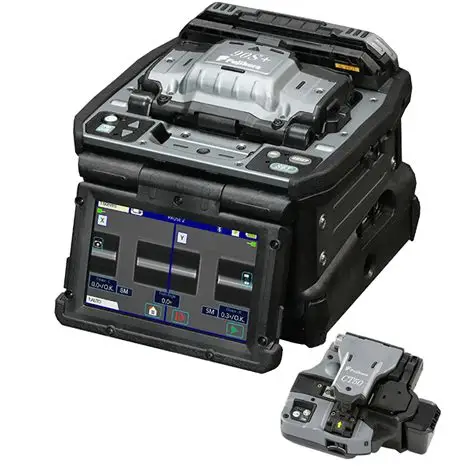
The Fujikura 90S+ remains the machine other core-alignment splicers are measured against. Its active core alignment delivers average splice losses of 0.02 dB on G.652 single-mode fiber and 0.01 dB on G.651 multimode (0.04 dB on DSF and NZDSF, 0.02 dB on G.657 bend-insensitive fiber, per Fujikura's official data sheet), with single-mode quick-mode splice times averaging 7–9 seconds and 60 mm slim-sleeve heating in 9–10 seconds. Two Fujikura technologies do the heavy lifting: ACTIVE FUSION CONTROL™, which analyzes both cleave end faces and the fiber's thermal emission in real time to optimize the arc, and ACTIVE BLADE MANAGEMENT™, which wirelessly tracks the paired cleaver's blade condition and rotates it automatically before cuts degrade. The 90S+ automates the entire workflow — auto wind protector, auto sheath clamps, fiber retention clamps — so a full splice-and-heat cycle proceeds without the operator touching the machine. A 4.9-inch color TFT touchscreen, 20,000-record splice storage, roughly 5,000-arc electrode life, and a 2.8 kg (battery-included) travel weight round out a package built for daily professional abuse.
2. INNO View 8+ — The Core-Alignment Productivity Splicer
Key Specs: Core alignment, 6 s splice / 9 s heat, 9,000 mAh battery rated about 355 cycles, 5.0-inch HD touchscreen with 320x magnification, Wi-Fi app connectivity.
Ideal For: High-volume FTTx and field production work, long days away from mains power, teams that review splice results from a smartphone.
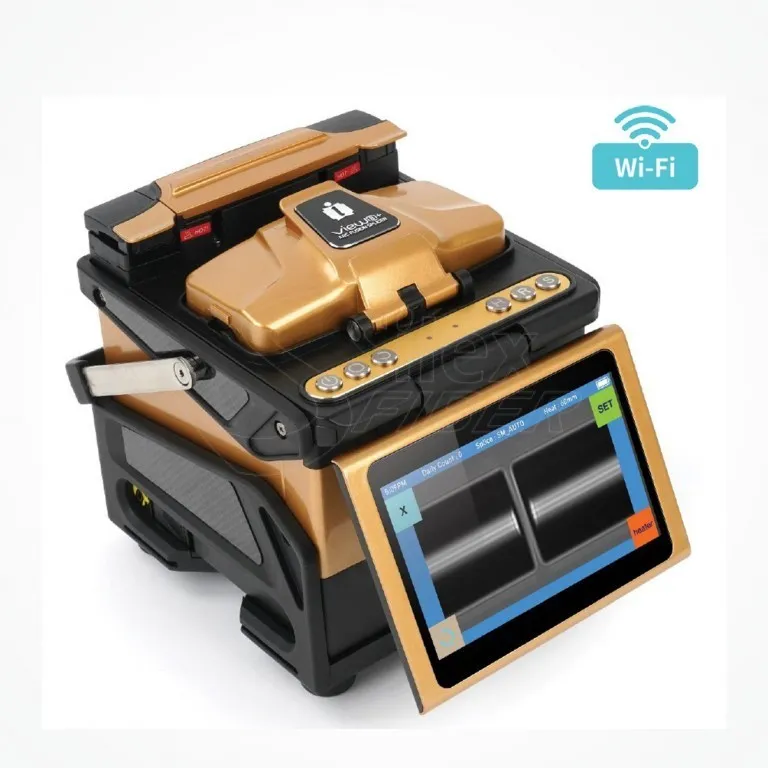
The INNO View 8+ is INNO Instrument's premium core-alignment splicer, built for professionals who demand flagship-grade precision through a full field day. It fuses single-mode fiber in 6 seconds in quick mode (8 seconds in SM auto mode) and heat-shrinks a sleeve in just 9 seconds, with typical splice loss of 0.02 dB on single-mode and 0.01 dB on multimode fiber (0.04 dB on DSF and NZDSF, 0.02 dB on G.657) and return loss over 60 dB. The defining spec is the 9,000 mAh battery — the largest capacity in this roundup — rated for roughly 355 splice-and-heat cycles per charge, while electrode life of 5,500 arcs (extendable with an electrode grinder) keeps consumable costs down on high-volume jobs. Automatic arc calibration by air pressure and temperature re-tunes the arc when altitude or weather changes, and the rubber-bumpered chassis is tested for shock resistance (76 cm drop), dust resistance (IP5X), and water resistance (IPx2), operating from -10°C to 50°C at altitudes up to 5,000 m in winds up to 15 m/s. The 5.0-inch HD LCD touchscreen delivers 320x magnification for clear fiber-end inspection, the last 10,000 splice results (data plus images) are stored on board, and a dedicated Wi-Fi app lets a supervisor check work progress and results from a smartphone. Fiber coverage spans SM (G.652 and G.657), MM (G.651), DS (G.653), and NZDS (G.655) across 128 splice and 32 heating modes, with 8–16 mm cleave lengths, 20–60 mm sleeves, and SOC (splice-on connector) support via a dedicated SOC fiber holder and heater cover. At 2.12 kg without its battery (2.78 kg with) in a 162 × 147 × 157 mm body, it stays genuinely portable — a core-alignment machine sized for crews that splice all day.
3. Sumitomo Electric T-72C+ — The AI-Powered Speed Specialist
Key Specs: High-definition core alignment, NanoTune™ AI arc optimization, 5 s splice time, 8 s heat time, IP52, 320 battery cycles, 6,000-arc electrode life.
Ideal For: Telecom carriers, backbone and trunk work, emergency repair teams.
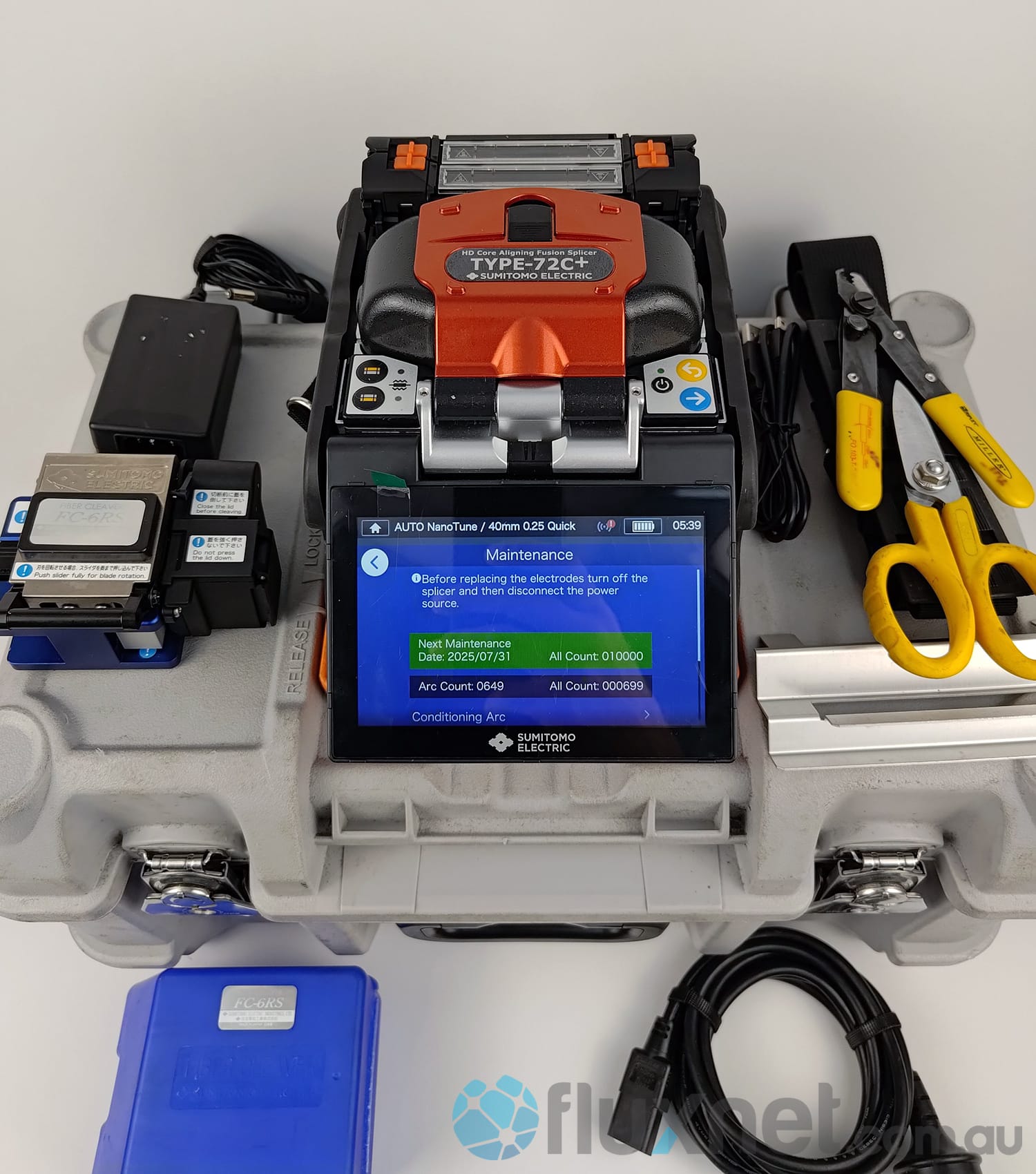
The T-72C+ is where AI visibly enters fusion splicing. Sumitomo's patented NanoTune™ technology automatically identifies optimal fusion-splicing conditions from the fiber's end face — when a cleave error is detected, the machine re-optimizes the arc instead of forcing a re-cleve, cutting rework on imperfect field cleaves. Speed is the other headline: 5 seconds per single-mode splice in SM Quick mode and 8-second heat shrink with a 60 mm sleeve, paired with a 320-splice-cycle battery and SumiCloud™ connectivity for IoT-based preventive maintenance. Fiber coverage is the widest in this list — G.651, G.652, G.653, G.654, G.655, G.657, and even erbium-doped fiber — with automatic fiber type detection and arc optimization. The chassis is rated IP52 with an IK07 impact-resistant display, works at altitudes up to 6,000 m, and the genuine ER-10 electrodes last 6,000 splices, the longest electrode life in this roundup. For carriers and emergency repair crews splicing mixed fiber plant in variable conditions, it's the strongest all-around flagship of 2026.
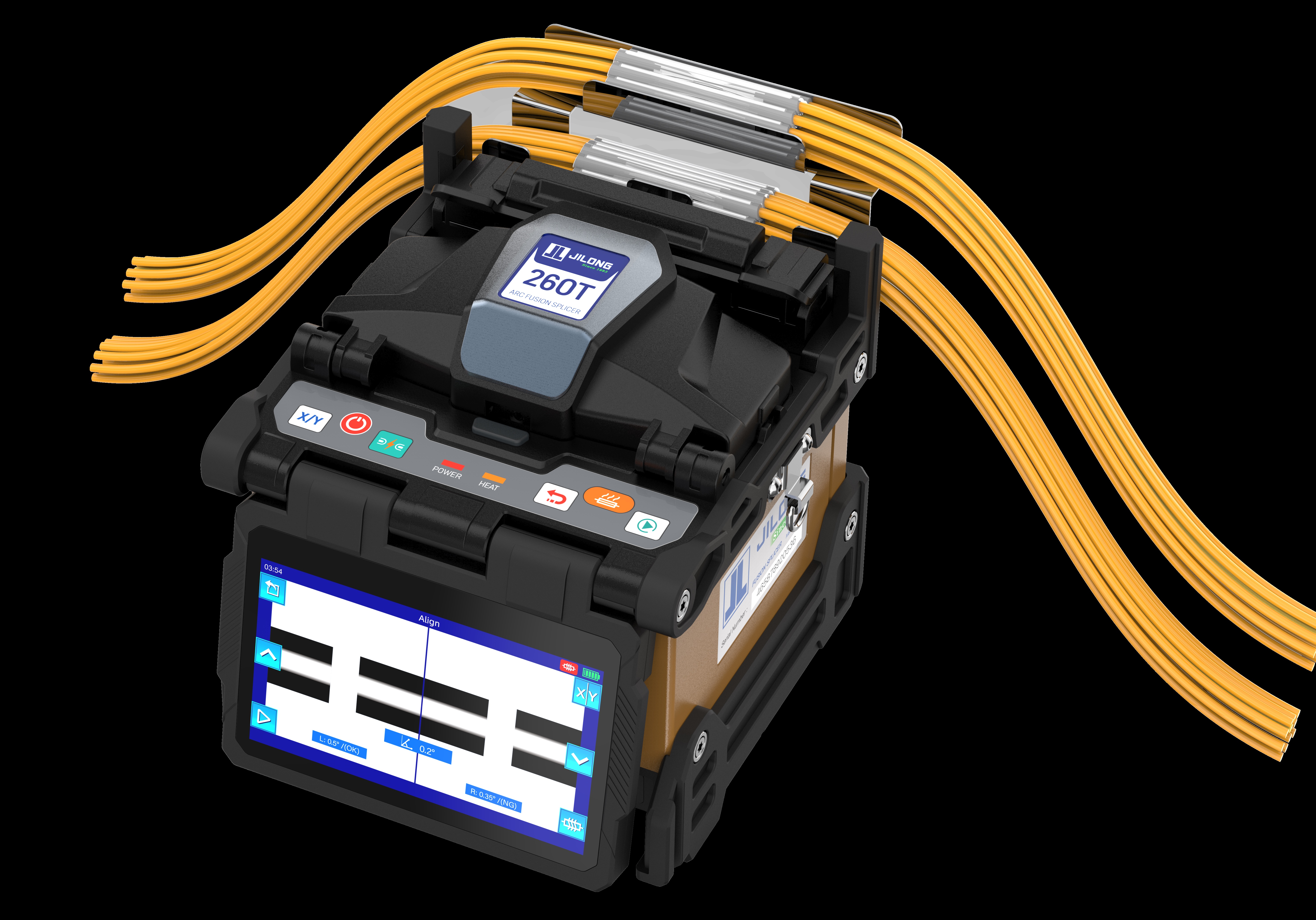
4. JILONG 260T — The All-Metal FTTx Workhorse
Key Specs: Active cladding alignment, all-metal chassis, 8 s splice / 10 s heat, SM (G.652 & G.657), MM (G.651), DS (G.653) and NZDS (G.655) fiber support, hot-swappable OPM/VFL module, CE-certified, ~350 battery cycles, 1.65 kg without battery.
Ideal For: FTTH/FTTx contractors, drop-cable installations, budget-conscious teams.
The 260T from Chinese veteran JILONG — the company built China's first domestic fusion splicer back in 1993, has shipped products to 100+ countries and regions, and co-drafted China's national fusion splicer standard (GB/T 17570-2019) — is the strongest value play of 2026 for FTTx work. It supports single-mode SM (G.652 & G.657), multimode MM (G.651), dispersion-shifted DS (G.653) and non-zero dispersion-shifted NZDS (G.655) fibers, and its active cladding alignment delivers typical splice loss of 0.02 dB on single-mode and 0.01 dB on multimode fiber with return loss over 60 dB, splices single-mode fiber in 8 seconds, and heat-shrinks a 40 mm sleeve in just 10 seconds in quick mode. Three features set it apart at this price point. First, the all-metal chassis — unusual in this class — shrugs off the drops and knocks of daily drop-cable work. Second, a tool-free, hot-swappable OPM/VFL module integrates an optical power meter and visual fault locator into the splicer itself, so a contractor can splice, test power, and locate faults with one box. Third, the 3-in-1 universal fixture handles bare fibers, 3.0 mm patch cords, pigtails, and drop cables without holder swaps, while a 3D dual heating element design speeds the heat cycle. The 5200 mAh battery is rated for roughly 350 splice-and-heat cycles per charge, electrodes last about 5,000 arcs, and the 4.3-inch touchscreen stores 10,000 splice records and 2,000 result images. It operates from -20°C to 50°C, at altitudes up to 5,000 m, in winds up to 15 m/s, and weighs just 1.65 kg without its battery. For buyers in CE markets, the 260T is CE-certified under the EU EMC Directive 2014/30/EU and Low Voltage Directive 2014/35/EU — certificate M.2022.206.C77032, issued by UDEM International Certification Auditing Training Centre Industry and Trade Inc. Co., valid through 30 August 2027, with the 260T listed among the covered models. JILONG backs it with a lifetime free service program (free maintenance, calibration, and training; labor covered, with customer-paid freight and parts, per the official product page), and its home-market reference price of RMB 4,150 makes it a compelling option for high-volume crews that don't need core alignment on every splice.
5. KomShine FX39 — The Six-Motor Trunk Splicer Value Pick
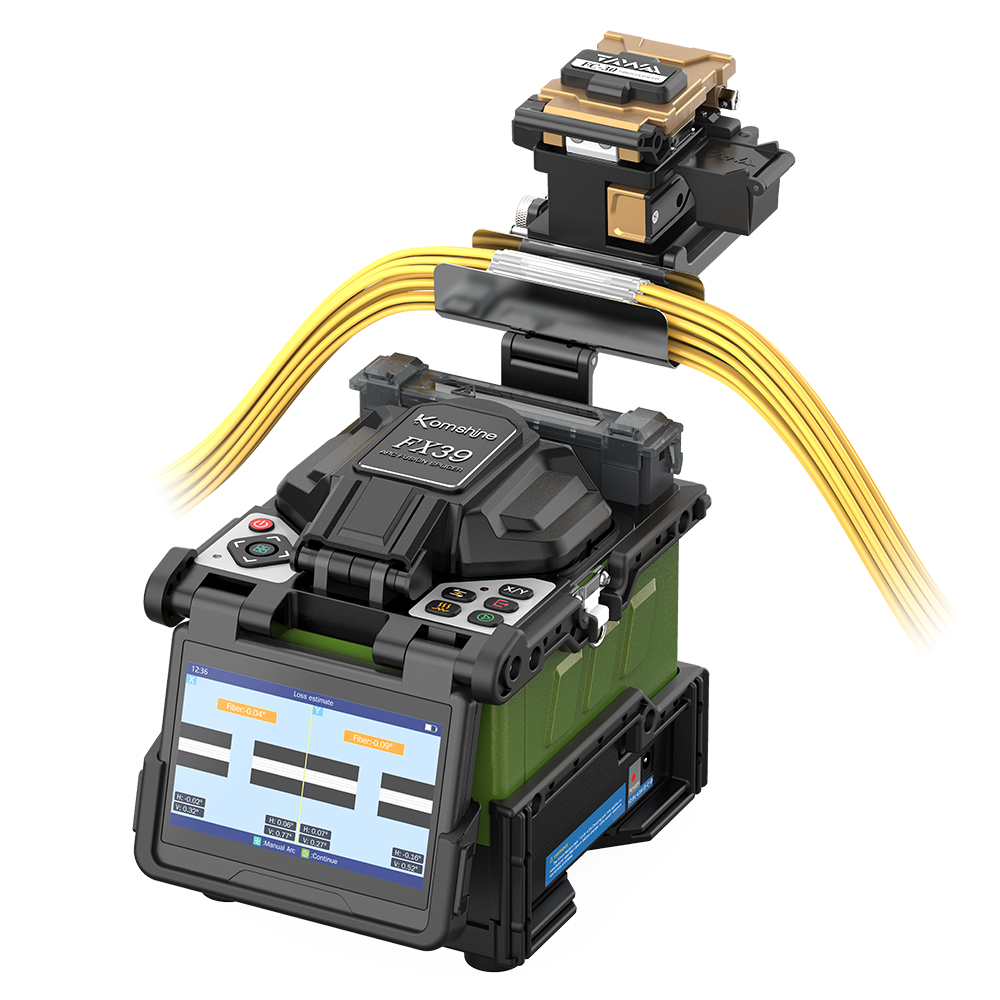
Key Specs: Core alignment with six motors, 6 s splice / 16 s heat, 7,800 mAh battery rated up to 450 cycles, 4.3-inch capacitive touchscreen, three-year warranty.
Ideal For: Trunk and backbone splicing, ISPs and contractors needing core alignment on a budget.
KomShine (the international brand of China's Jixing Optical Communication) targets a specific gap with the FX39: trunk-grade core alignment at a fraction of Japanese flagship pricing. The six-motor, core-alignment platform delivers typical splice loss of 0.02 dB on single-mode and 0.01 dB on multimode fiber (0.04 dB on DSF and NZDSF, 0.02 dB on G.657), with return loss over 60 dB — the same headline numbers as machines costing several times more. Splice time is 6 seconds on single-mode G.652 in quick mode, with 16-second heat shrink on a 40 mm sleeve, and automatic arc calibration compensates for ambient temperature and pressure changes. The 7,800 mAh battery is among the largest in this roundup, rated for up to 450 splice-and-heat cycles per charge per KomShine's published spec sheet, and the electrode life is rated at about 5,000 discharges. Practical field details are well handled: replaceable universal fixtures (with an optional SOC fixture), 8–16 mm cleave length support, 20–60 mm sleeve compatibility, a shock-absorbing and water-resistant silicone jacket, 10,000 splice data records and 2,000 images in storage, and operation from -20°C to 50°C at altitudes up to 5,000 m. At 1.72 kg without the battery (2.25 kg with) and a 158 × 132 × 157 mm footprint, it's a compact trunk splicer, and the standard three-year warranty (per KomShine's official product page) de-risks the purchase. For crews that need true core alignment on trunk routes but can't justify flagship pricing, the FX39 is 2026's most credible value pick.
Choosing the right fusion splicer depends on your specific project requirements and budget. The models above have been carefully reviewed to ensure they offer the best performance, versatility, and value for modern fiber optic needs — ensuring you stay ahead in 2026 and beyond.
Step-by-Step Tutorial — How to Use a Fusion Splicer
Effectively using a fusion splicer requires precision and attention to detail. This step-by-step guide ensures you're equipped to achieve seamless splices, enhancing network performance with professional results.
Step 1 — Prepare the Fiber
Preparation is critical. Strip, clean, and cleave the fiber carefully. Use high-precision tools to maintain accuracy, and keep the cleave length within your splicer's supported range (8–16 mm on all five machines above). Always clean exposed fiber ends with lint-free wipes and 99% isopropyl alcohol to remove debris. This ensures optimal signal transmission and prevents contamination — the single most common cause of excess splice loss.
Step 2 — Insert and Align
Insert the prepared fibers into their respective holders and load them into the fusion splicer. Verify that they are seated securely before closing the wind protector — a poorly seated fiber is the most common cause of a failed splice. The splicer will auto-detect fiber type and align the fibers in the chamber with precision, minimizing manual adjustments.
Step 3 — Splice and Heat
Press the start button to begin the fusion process. The splicer uses a controlled arc to fuse the fibers without gaps or impurities — modern machines automatically adjust the arc for ambient temperature and pressure before firing. Once completed, place the splice into the integrated oven to heat and shrink the protection sleeve, ensuring durability and long-term reliability.
Step 4 — Inspect and Test
After splicing, visually inspect the joint for irregularities or imperfections. Use tools like an OTDR (Optical Time-Domain Reflectometer) or other qualitative testing methods to verify splice integrity — and remember that for link-level verification, bidirectional OTDR averaging is the professional standard, since one-directional readings can misstate loss at mismatched joints. If your splicer supports it, sync or store data for record-keeping and analysis.
Pro Tips
- Rotate your cleaver blade regularly to prevent uneven cuts that compromise splice quality — or use a splicer with automatic blade management, like the Fujikura 90S+ with its CT50 cleaver, which rotates the blade wirelessly before quality degrades.
- Keep the electrodes clean and calibrated to ensure consistent splicing performance, and replace them on schedule (see the maintenance section below).
- Store your fusion splicer in a clean, dust-free environment to maintain its precision over time.
By following these steps and tips, you'll improve splice quality, reduce losses, and prolong the lifespan of your fiber connections — all essential for maintaining robust and reliable networks.
Fusion Splicer Maintenance and Calibration
Proper maintenance and calibration of your fusion splicer ensure top performance and long-term reliability. Whether you're managing routine splices or tackling high-volume projects, a well-maintained splicer is key to delivering precision and minimizing downtime.
Electrode, Blade, and V-Groove Care
The condition of your electrodes, cleaver blade, and V-grooves directly impacts splice quality. Good news for 2026 buyers: electrode life on current-generation machines has roughly tripled versus older models — the Fujikura 90S+ and JILONG 260T are rated around 5,000 arcs, the INNO View 8+ around 5,500 (extendable with an electrode grinder), the KomShine FX39 about 5,000 discharges, and the Sumitomo T-72C+ reaches 6,000 splices with genuine ER-10 electrodes. Follow your machine's splice counter rather than a fixed interval, and replace electrodes in matched pairs. Daily cleaning of fiber holders and V-grooves remains essential to prevent misalignment caused by dust or residue — a small investment of time here saves countless headaches in the field.
Software Updates and Diagnostics
Firmware updates aren't optional — they're a must. They often include new fiber type support, improved alignment algorithms, and bug fixes that keep your splicer operating at peak efficiency. Take advantage of diagnostic modes to quickly identify and troubleshoot errors, and if your machine offers cloud-based preventive maintenance (Sumitomo's SumiCloud™ is the leading example, notifying you when service is due before the device fails), use it. Staying proactive with updates ensures you're always ahead of potential issues.
Storage and Transport
Your fusion splicer is a precision instrument, so treat it like one. Store it in a padded, shockproof case to protect it from impacts during transport. Avoid extreme temperatures and humidity, and respect your machine's storage envelope (typically -20°C to 60°C, 0–95% relative humidity for the models reviewed above). Proper storage practices extend the life of your equipment, keeping it ready for action when you need it most.
Regularly maintaining and calibrating your splicer doesn't just boost performance — it builds trust in your results on every project. Keep your tools sharp, your methods updated, and your equipment protected, and you'll stay ahead in the fast-evolving fiber optic industry. Reliability starts with care.
Choosing the Right Fusion Splicer for Your Needs
When it comes to fusion splicing, selecting the right device can make or break your project's success. With so many models available, aligning your choice with specific applications, budgets, and long-term goals is key. Below, we break down the criteria to help you decide.
Match the Splicer to the Job
Not all splicers are built the same. Identifying your primary use case ensures you invest in a tool designed for optimal performance.
- Enterprise and backbone networks: Prioritize core-alignment flagships with automation and connectivity — the Fujikura 90S+ and Sumitomo T-72C+ are built exactly for this, with AI-assisted arc control and cloud data management for minimal manual intervention.
- FTTH deployments: For Fiber to the Home installations, go for lightweight, compact cladding-alignment models with drop-cable-ready fixtures. The JILONG 260T — with its 3-in-1 fixture, integrated OPM/VFL, and 1.65 kg body — is purpose-built for this work and lists at a reference price of RMB 4,150 in its home market, a fraction of flagship cost.
- FTTx production work and long field days: The INNO View 8+ pairs core-alignment precision with a 9,000 mAh battery rated for about 355 cycles per charge, plus a Wi-Fi smartphone app for checking results on the go — built for crews that splice from dawn to dusk.
- Data centers: Data center construction involves ribbon and mass splicing of high-count cables, which calls for a dedicated ribbon or mass fusion splicer with fast cycles and multi-fiber support — Sumitomo's T-72M12+ line is built for exactly this work.
- Trunk work on a budget: The KomShine FX39 brings six-motor core alignment to trunk and backbone routes at a value price, with a three-year warranty for peace of mind.
Budget vs. Performance
Every project comes with budget constraints, but it's crucial to weigh immediate costs against long-term benefits.
- Entry-level cladding-alignment splicers start well under US$2,000 — and value-oriented manufacturers have pushed the floor lower still (the JILONG 260T's home-market reference price of RMB 4,150 converts to roughly US$610 at the August 2026 CFETS central parity rate of 6.7873) — offering solid functionality for small businesses or high-volume FTTH crews.
- High-performance core-alignment models, typically US$7,000 and up, provide the lowest splice loss, the widest fiber coverage, and smart features that reduce errors and downtime.
- Think ROI when making your decision. A pricier model may save you money over time with fewer splice errors and greater operational efficiency; conversely, paying flagship money for pure drop-cable work wastes budget that a machine like the 260T handles for a small fraction of the cost.
Training and Support
Even the most advanced splicer isn't useful if operators can't use it effectively or repairs become a hassle. That's why comprehensive support resources are essential.
- Choose manufacturers that back their products with detailed tutorials, training programs, and dedicated technical support teams — JILONG's lifetime free maintenance, calibration, and training program (labor costs waived) is worth noting here, as is KomShine's three-year warranty on the FX39. INNO's INNOCare 24 service commitment, which promises expert assistance within 24 hours, is another good example.
- Look for vendors with a dense service and calibration network in your region, so routine servicing never leaves your crew waiting on downtime.
- Onboard guidance features (Fujikura's SPLICE COACH™) shorten the learning curve for new technicians.
By aligning your selection with your application, budget, and operational needs, you'll not only streamline your splicing process but also boost efficiency in the long run. The right fusion splicer is more than just a tool — it's a solution tailored to your business objectives.
Key Takeaways
- Fusion splicers are essential tools for building and maintaining high-performance fiber optic networks, and 2026's AI-driven data center expansion makes splice quality more valuable than ever.
- Core alignment models (Fujikura 90S+, INNO View 8+, Sumitomo T-72C+, KomShine FX39) provide the highest precision for trunk and enterprise work, while cladding alignment models (JILONG 260T) offer outstanding value for FTTx and lighter jobs.
- The best 2026 splicers combine 5–8 second splice times, 0.01–0.02 dB typical loss, rugged designs, 300–450 cycle batteries, and AI/cloud connectivity for real-world use.
- Proper training, maintenance, and calibration — 5,000–6,000-arc electrode life notwithstanding — remain critical for long-term reliability and splice quality.
- Choose a splicer that fits your specific use case, budget, and volume needs — not just the top brand. The five models above span the 2026 market from flagship precision to best-in-class value; for ribbon and mass splicing, look to a dedicated ribbon machine.
Frequently Asked Questions
1. What is a fusion splicer and why is it important?
A fusion splicer is a precision tool used to join two optical fibers by fusing them together with an electric arc. This process minimizes signal loss and reflection, making it essential for building high-performance, long-distance fiber optic networks.
2. What's the difference between core alignment and cladding alignment splicers?
- Core alignment splicers offer the highest accuracy by aligning the fiber cores using advanced imaging systems — ideal for enterprise, backbone, and trunk networks. Examples: Fujikura 90S+, INNO View 8+, Sumitomo T-72C+, KomShine FX39.
- Cladding alignment splicers align fibers based on their outer cladding and are more affordable — best suited for FTTH, drop-cable work, and budget-conscious projects. Example: JILONG 260T.
3. Which fusion splicer is best for FTTH (Fiber to the Home) installations?
For FTTH projects, lightweight and user-friendly splicers like the JILONG 260T are excellent options. Its 3-in-1 universal fixture handles bare fibers, patch cords, pigtails, and drop cables without holder swaps, the integrated OPM/VFL module covers power testing and fault location, it splices in 8 seconds with 10-second heating, and its home-market reference price (RMB 4,150) keeps high-volume crews profitable.
4. How long does a fusion splicer typically last?
With proper care, a quality fusion splicer can last 5 to 8 years. Regular maintenance like electrode replacement, cleaver blade rotation, firmware updates, and proper storage will help extend its service life and ensure reliable performance.
5. How often should I replace the electrodes in a fusion splicer?
Modern 2026-generation splicers rate electrode life far longer than older machines — approximately 5,000 arcs on the Fujikura 90S+, JILONG 260T, and KomShine FX39, about 5,500 arcs on the INNO View 8+, and up to 6,000 splices on the Sumitomo T-72C+ with genuine ER-10 electrodes. Many splicers have a built-in counter and will alert you when replacement is due; follow it rather than a fixed calendar interval, since actual life varies with fiber type, environment, and splice modes.
6. Can I use the same splicer for both single and ribbon fibers?
Not all models support both — the five single-fiber splicers reviewed above each handle one fiber at a time. If your work involves multi-fiber ribbons or mass splicing, look at a dedicated ribbon machine such as Sumitomo's T-72M12+, which handles 1-to-12-fiber ribbons with an 11-second quick-mode splice on 12-fiber ribbon.
7. What features are most important when selecting a fusion splicer?
Key features to consider include:
- Splice time and precision (5–8 s splice, 0.01–0.02 dB typical loss on 2026 models)
- Battery life and portability (300–450 splice-and-heat cycles per charge)
- Core vs. cladding alignment, matched to your job type
- Connectivity options (Bluetooth, cloud services, apps)
- Durability for field use (IP ratings, metal or silicone-protected chassis, wide temperature and altitude ranges)
https://www.jilongot.com
南京吉隆光纤通信股份有限公司